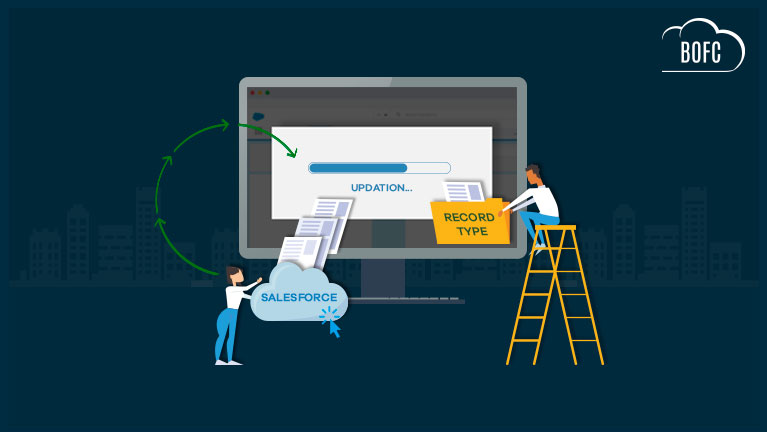
Salesforce Admins and Developers often face requirements to mass update Record Type details—including basic information and picklist values—across Standard, Custom, and Managed Objects. Using Salesforce’s standard setup screens, this process requires opening each Record Type and then updating each Picklist individually, making the task manual, repetitive, and time-consuming.
In orgs with multiple objects and Record Types, this approach quickly becomes inefficient and increases the likelihood of configuration inconsistencies.
Challenges with Salesforce Standard Record Type Management
When using native Salesforce tools, Admins encounter several limitations:
-
No built-in option to mass update Record Types
-
Picklist values must be updated one Record Type at a time
-
Difficult to maintain consistency across multiple objects
-
Not scalable for large or enterprise Salesforce orgs
These challenges make Record Type and Picklist management one of the most tedious metadata tasks for Salesforce Admins.
Mass Update Record Types Using BOFC
Salesforce Bulk Object Field Creator (BOFC) is a powerful AppExchange tool that allows Salesforce Admins to mass update Record Types and Picklist values in a few clicks.
BOFC supports Record Types across all object types, including Standard, Custom, and Managed Objects, enabling Admins to manage configurations efficiently at scale.
What You Can Update with BOFC
Using BOFC, Admins can:
-
Update basic details for multiple Record Types across multiple objects
-
Mass update Picklist values for multiple Picklists, across multiple Record Types and objects
-
Apply consistent changes without repetitive manual steps
All updates are handled through a simple, intuitive, and fully clickable interface—no code or metadata deployment required.
Benefits of Using BOFC for Record Type Management
-
Mass update Record Types in Salesforce
-
Bulk update Picklist values across objects and Record Types
-
Supports Standard, Custom, and Managed Objects
-
Eliminates manual Record Type-by-Record Type updates
-
Saves significant admin time and reduces configuration errors
-
Ideal for org cleanup, standardization, and governance
Why Salesforce Admins Choose BOFC
BOFC is built to simplify Salesforce metadata management at scale. By automating Record Type and Picklist updates, Admins can maintain configuration consistency, accelerate org changes, and reduce operational overhead.
If you’re looking for the best way to mass update Record Types and Picklist values in Salesforce, BOFC provides a fast, reliable, and admin-friendly solution.
To avail this feature, kindly make sure you have installed the latest version of the application. You can upgrade your package using either of two ways:
- In Salesforce, go to “BOFC Home > Settings > App Version > Click to Upgrade” — or —
- Refer the below button to quickly upgrade your package to the latest version and explore its complete benefits:
Few Simple Steps to Update Record Types in Salesforce
1. Open the BOFC Home > Go to Record Type Section & click the highlighted link
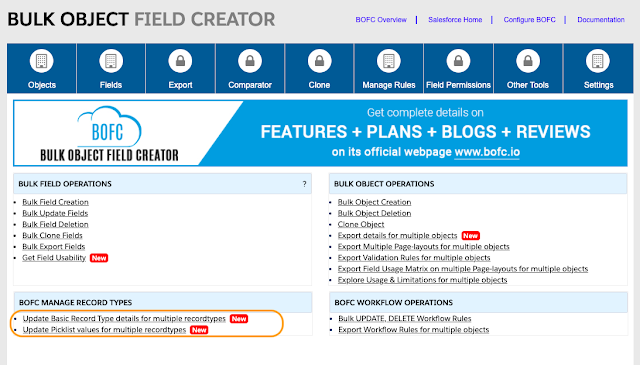
2. It will open below screen for BOFC Manage Record Types

User can perform two kind of update operation:
- Update Basic details of Record Types (follow steps 3 to 7)
- Update Picklist values assigned to multiple Record Types (follow step 8 to 12)
Will go through both the functionality one by one
****************
Update Basic details of Record Types
3. Select Object (single or multiple) & choose “Basic details” radio button as shown in below image. Once selected, click on “Fetch Details”

4. Select (single or multiple) record types & click “Display Record Type Details”
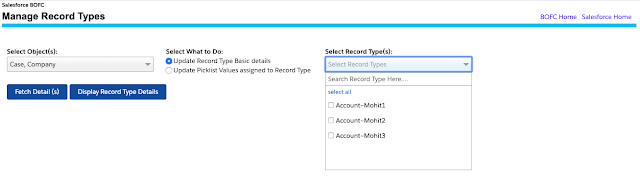
5. Once clicked, it will display basic details for all the record types selected in step 4. User can modify the details and select the rows which needs to be updated.
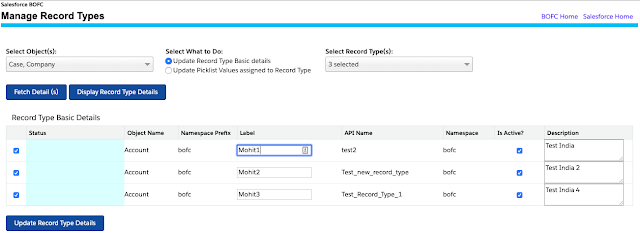
6. Once all the changes are done, click on “Update Record Type Details”
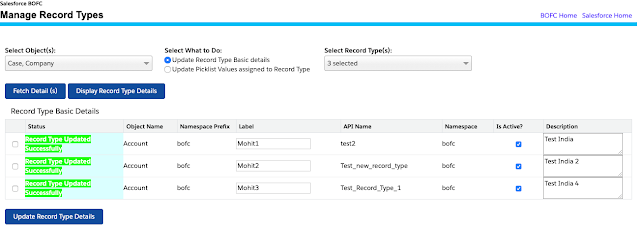
7. Once the update action is completed, it will show “Success or Error” status message in-front of each row.
****************
Update Picklist values for Multiple Record Types
8. Select Object (single or multiple) & choose “Update Picklist Values” radio button as shown in below image. Once selected, click on “Fetch Details”

9. Select record type (single or multiple), select Picklist (single or multiple) & click “Display Details”
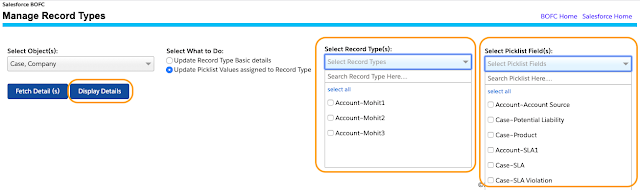
10. Once clicked, it will display all the selected picklist for all the record types selected in step 9. User can add or remove pick list values by clicking the required arrows and select the Picklist rows which needs to be updated.
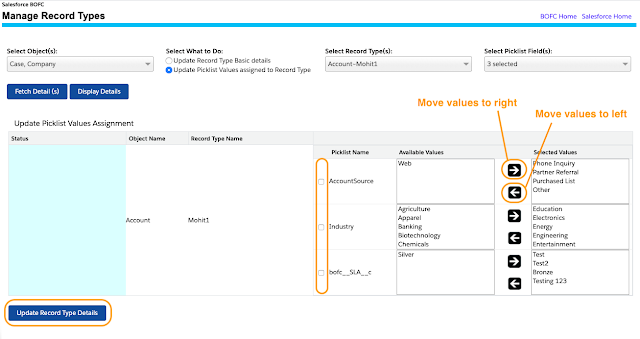
11. Once all the changes are done, click on “Update Record Type Details”
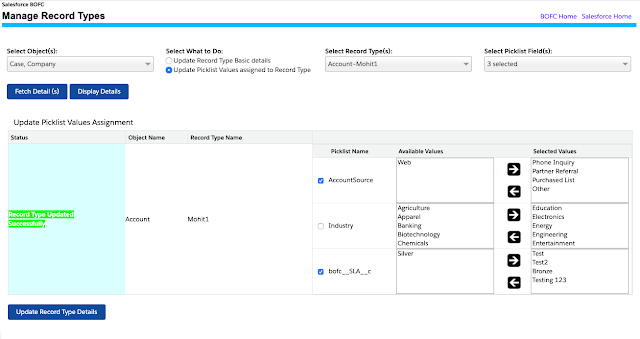
12. Once the update action is completed, it will show “Success or Error” status message in-front of each row.
******************************************************************************
Have you started using BOFC yet? Thousands of BOFC users have been able to save time & boost productivity using our Salesforce Metadata app. Click here to install the latest version of BOFC application in your Salesforce instance & explore its complete benefits for you.
For any queries or suggestions, you can contact us at https://www.bofc.io/#contact or mail us: support@bofcapp.io. Our BOFC Expert will help you get the best out of it.