How to Bulk Clone Custom Metadata Types (with records) in Salesforce?
Published: Sep 23 2022
Last Updated: Oct 15 2026
ABC Company is using Salesforce to manage its Sales, Service Cloud activities. They have lot of Custom Metadata Types which are being used to manage specific information for the business processes.
ABC Company is expanding its business and want to setup a new Salesforce org (Org 2) which is replica of existing salesforce org (Org 1). In order to replicate, they need to perform multiple activities like:
- Clone Custom Objects/Fields: Refer this article to perform this action in few clicks
- Clone Flows: Refer this article to perform this action in few clicks
- Clone Custom Metadata Types (along with its records)
How to bulk clone Custom Metadata Types with records?
As both the orgs (Org 1 & Org 2) are not inter-linked to each other, Alex (an administrator of ABC Company), will have to manually copy each and every entities and complete his action.
For eg: In case, if a developer has to Bulk clone Custom Metadata Types of different types, then admin would have to open each and every Custom Metadata Types and clone them to new org.
These type of work requests would take much more effort and time, but with our Salesforce Appexchange Bulk Object Field Creator (BOFC) App, user can Clone Custom Metadata Types within “Current Salesforce org” or from any “External Salesforce org” in few clicks.
Benefits of BOFC to Clone Custom Metadata Types in Salesforce:
- User can clone any type of Custom Metadata Types using BOFC
- User can also Clone records related to multiple Custom Metadata Types
- This feature has option for a user to choose whether they need to override any existing or create new Custom Metadata Types
- User can clone Custom Metadata Types from Same or External (non-linked) salesforce org
- Simple Point & Click UI only.
To avail this feature, kindly make sure you have installed the latest version of the application. You can upgrade your package using either of two ways:
- In Salesforce, go to “BOFC Home > Settings > App Version > Click to Upgrade” — or —
- Refer the below button to quickly upgrade your package to the latest version and explore its complete benefits:
Guide to Bulk Clone Custom Metadata Types in salesforce
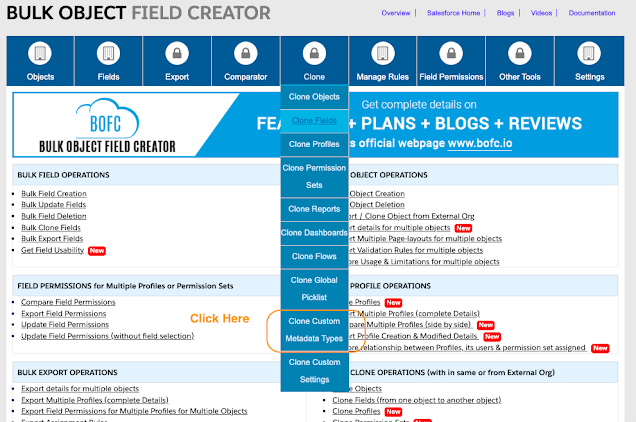
1. Open the BOFC Home > Click “Clone Custom Metadata Types”
2. It will open below screen for BOFC Clone Custom Metadata Types. Select the mode of Operation as “Clone”

3. Select the type of entities to Clone & the “Source Org” from where you want to clone the Custom Metadata Types
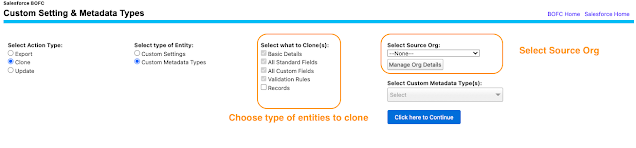
NOTE: User can click on “Records” checkbox to clone the records related to the Custom Metadata Types.
User can clone the Custom Metadata Types from different type of source orgs:
- Can clone from “Current Salesforce Org” in which BOFC is installed
- Can clone from “External Salesforce org” (Salesforce org which are linked / non-linked to current org in which BOFC is installed)
4. Select the single or multiple Custom Metadata Types which needs to be cloned. Once ready, click on “Click here to Continue” button to initiate the process.
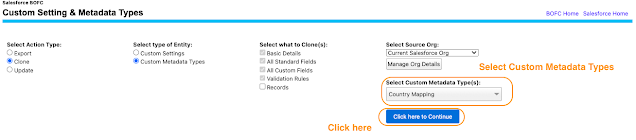
Once this blue button is clicked, it will open a popup with some instruction in it. Just follow the instructions and you are done.
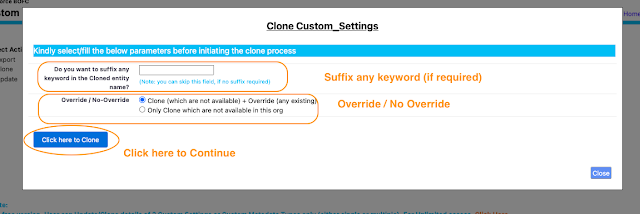
- Append Keyword – User can add any keyword in the Custom Metadata Types Name. If user leaves the field blank, then nothing will be added.
- Type of Action –
- Clone (which are not available) + Override (any existing) = In this case, the clone process will create the new Custom Metadata Types & override any existing with same name
- Only Clone which are not available in this org = In this case, the clone process will create the Custom Metadata Types which are not available in the current org
5. Once the “Click here to Clone” buttons is clicked, it will update the status against each row for all the Custom Metadata Types.
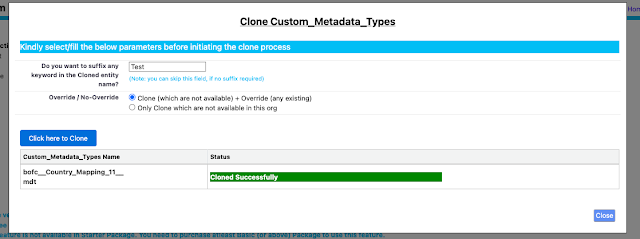
Green means – Custom Metadata Types Cloned Successfully
Red means – Flow got error out because of some reason.
For more details, refer to the feature page of this application : Clone Custom Metadata Types