How To Bulk Export Approval Process in Salesforce ?
Published: Aug 17 2021
Last Updated: Jun 02 2026
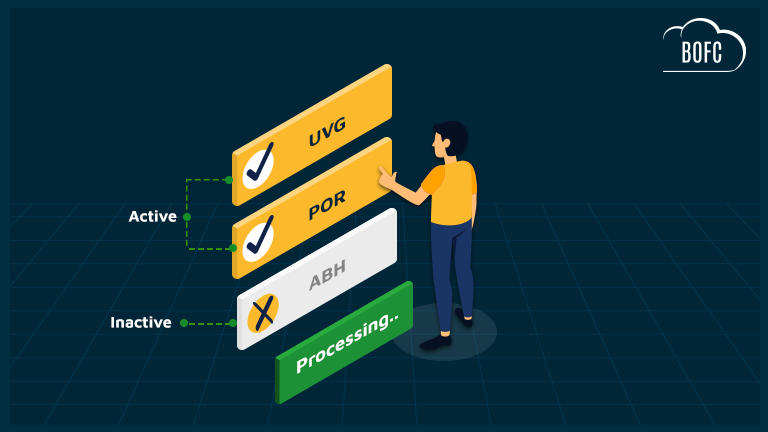
Managing Approval Processes in Salesforce becomes increasingly difficult as your org grows. Over time, organizations create bulk Approval Processes across different objects, departments, and business workflows. Some remain active and heavily used, while others become inactive after process changes or business restructuring.
The challenge begins when Salesforce Admins or Developers need to review, audit, document, migrate, or compare these Approval Processes. Salesforce does not provide a simple native way to bulk export Approval Processes together in a structured format. Teams often end up manually opening each Approval Process one by one, which consumes significant time and increases the chances of missing important configurations.
This becomes even more critical during:
- Salesforce org audits
- Sandbox refresh activities
- Compliance documentation
- Deployment planning
- Org cleanup projects
- Migration to new Salesforce environments
While Salesforce provides metadata and approval-related data access through technical tools like Data Loader and APIs, the process is not admin-friendly and usually requires technical expertise.
BOFC (Bulk Object Field Creator) simplifies this entire process by allowing users to export Approval Processes in just a few clicks through a simple point-and-click interface. Instead of spending hours manually reviewing approval configurations, Admins can generate organized exports quickly and efficiently.
With BOFC, users can:
- Export Active and Inactive Approval Processes together
- Export multiple Approval Processes in bulk
- Save approval configurations for documentation and audits
- Reduce manual effort and repetitive tasks
- Simplify Salesforce governance and org management
To avail this feature, kindly make sure you have installed the latest version of the application. You can upgrade your package using either of two ways:
- In Salesforce, go to “BOFC Home > Settings > App Version > Click to Upgrade” — or —
- Refer the below button to quickly upgrade your package to the latest version and explore its complete benefits:
Few Simple Steps to Bulk Export Approval Process in Salesforce:
1. Open the BOFC Home > Click “Export Approval Process”
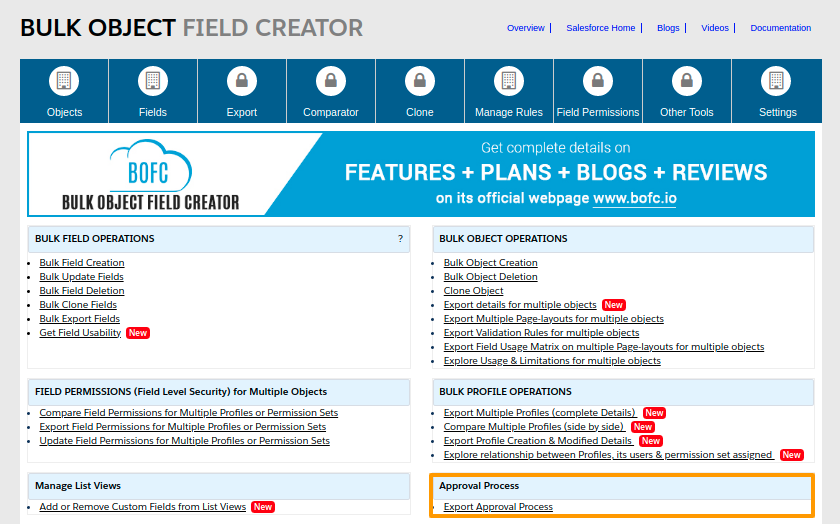
2. It will open below screen for Approval Process.

3. Select the Type operation as “Export Approval Process” and screen looks like below image
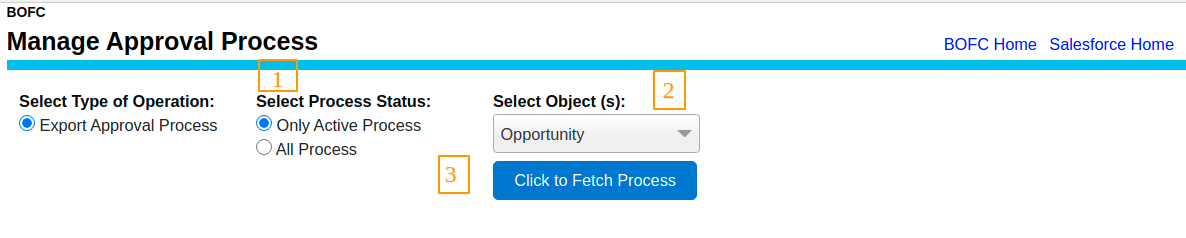
Above image has many features (each number has its description as below):
-
- Select the Process status like Active / All Process.
- User can select single or multiple objects from the dropdown
- Click on “Click to Fetch Process” button to fetch approval processes.
4. Once the button “Click to Fetch Process” is clicked , it will display the list of approval process in form of table:
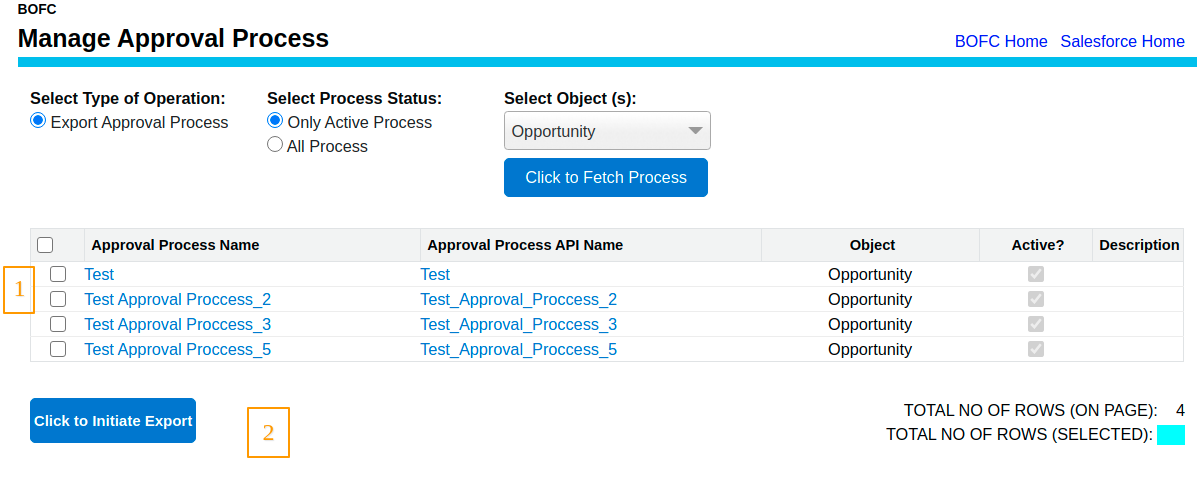 Above image has many features (each number has its description as below):
-
- Select the Single or Multiple Approval Process.
- Click on “Click to Initiate Export” button to export selected process.
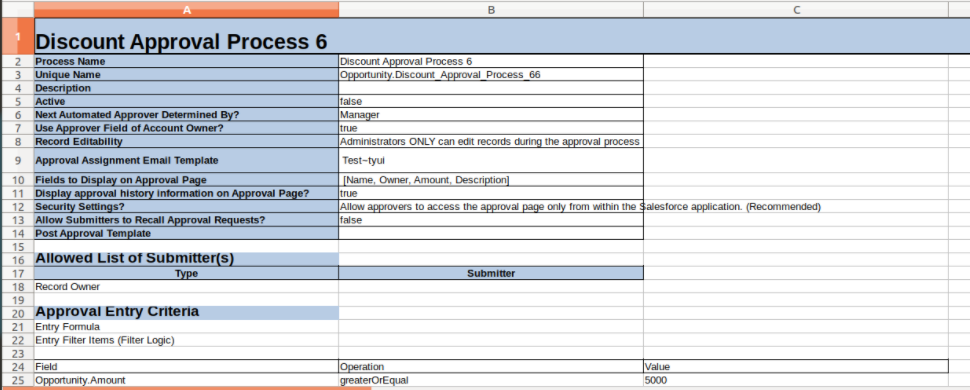
5. Once the file is downloaded, just open it and your approval process sheet looks like the below image::
Why Use BOFC for Exporting Approval Processes?
BOFC helps Salesforce teams eliminate the manual effort involved in Approval Process documentation and management. Instead of navigating through Setup repeatedly, users can export everything in a structured and scalable manner.
Bulk Export Without Manual Effort
Export multiple Approval Processes simultaneously without opening each process individually. This significantly reduces administrative overhead.
Export Both Active & Inactive Processes
Many organizations need visibility into inactive Approval Processes for audits, cleanup, or historical reference. BOFC ensures both active and inactive processes can be exported together.
Simplified Documentation & Audits
Approval Processes are often part of compliance reviews and internal audits. BOFC helps generate documentation faster and keeps your Salesforce governance organized.
No Coding or Metadata API Complexity
Traditional export methods often require Data Loader, Metadata API usage, or developer involvement. BOFC removes that complexity with an intuitive UI designed specifically for Salesforce Admins and Consultants.
Faster Org Analysis & Migration Planning
When migrating metadata between orgs or analyzing existing business workflows, exported Approval Process information becomes extremely valuable for planning and validation.
Save Time for Salesforce Teams
Tasks that normally take hours can now be completed within minutes, allowing Admins and Developers to focus on more strategic Salesforce activities.
Conclusion
Approval Processes are one of the most important automation components inside Salesforce, but managing and documenting them manually can quickly become overwhelming in large orgs.
BOFC provides a faster, cleaner, and more scalable way to export both Active and Inactive Approval Processes without relying on complicated technical tools or manual effort. Whether your goal is documentation, compliance, migration planning, or org cleanup, BOFC helps Salesforce teams complete the task efficiently in just a few clicks.
If your Salesforce team regularly works with metadata management, audits, or large-scale admin operations, BOFC can significantly improve productivity and reduce operational complexity.