
Black Friday Sale: Get 30% OFF on All Plans!

How to Clone Multiple Field Sets in Salesforce with BOFC?

Published: Jun 03 2025

Last Updated: Nov 05 2026

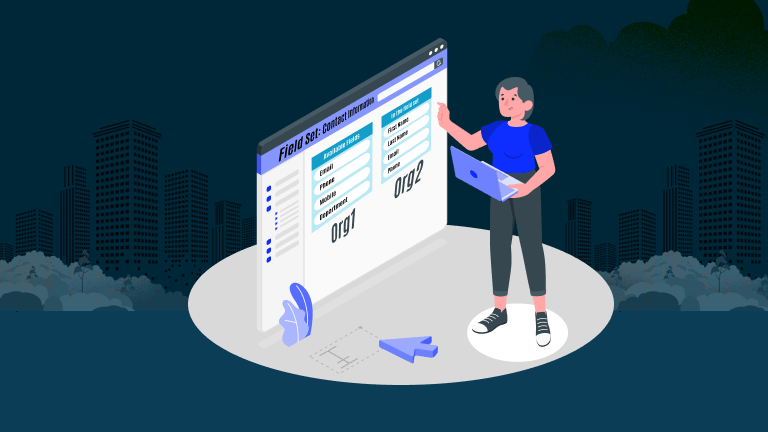
clone multiple FieldSets
Quick Answer:

How do you clone multiple Field Sets in Salesforce?

Open BOFC, click Clone Field Sets and choose Clone multiple Field Sets. Select the source org and objects, fetch their Field Sets, pick the ones you need and clone them into your current org. BOFC does this in bulk, from the same org or an external org, so you do not rebuild each Field Set by hand.

Why Cloning Field Sets One by One Slows You Down?

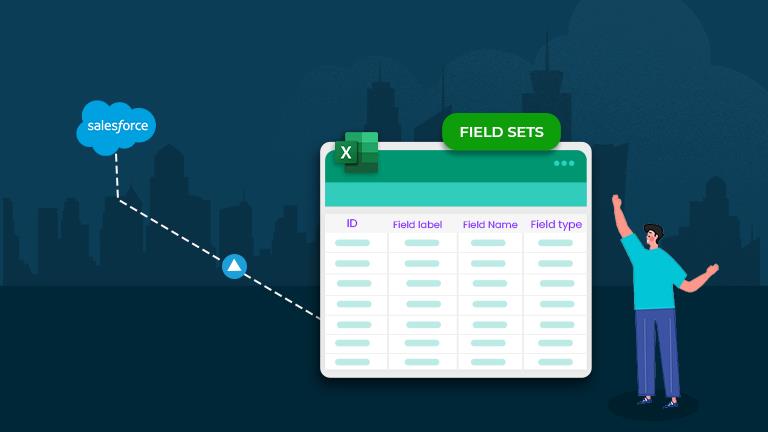
A Field Set is a grouping of fields on an object that Visualforce pages, Lightning components and Apex can use to decide which fields to show. Setting up the same Field Sets in a new sandbox or client org means opening each object, creating the Field Set and adding the same fields again. Across many objects and orgs, that turns a quick task into days of repetitive work, and one missed field leaves a page showing the wrong fields.

The pressure peaks during org migrations, sandbox refreshes, implementation rollouts and metadata standardization projects. Speed matters, and so does getting every Field Set right the first time.

BOFC (Bulk Object Field Creator) handles this in bulk. You pick the source objects, select the Field Sets and clone them, either within the same Salesforce org or from an external org you add under Manage Org Details.

Steps to Clone Multiple Field Sets in Salesforce

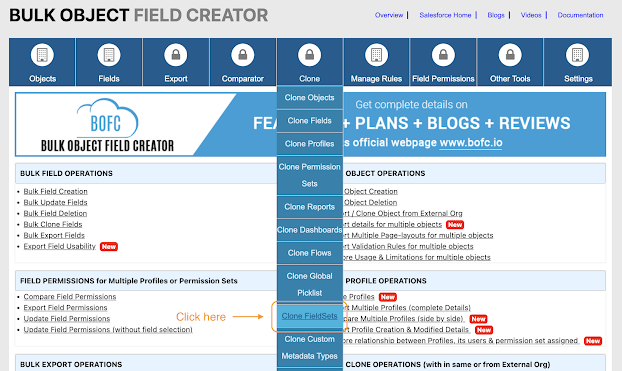
1. Open the BOFC Home > Click “Clone FieldSets”

Clone FieldSets

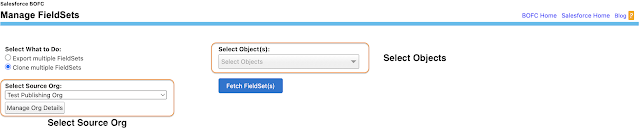
2. It will open below screen to Clone FieldSets. Select the type of operation as “Clone multiple FieldSets” option in radio button.

Clone multiple FieldSets

3. Select the source org from which FieldSets needs to be cloned. In case source org is not available in drop down, kindly click on “Manage Org Details” to add new source org.

Once source org is selected, it will display the list of source objects. Select single or multiple source objects. Once ready, click “Fetch FieldSets(s)” button to initiate the process to fetch all the existing FieldSets of selected objects.

Manage Org Details

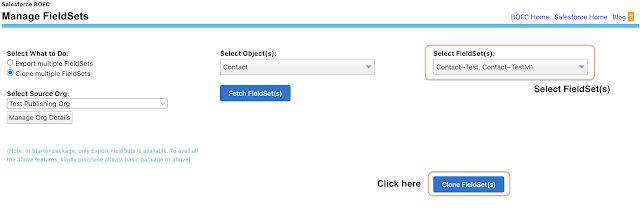
4. Select the single or multiple FieldSets. Once ready, click on “Clone FieldSets” button to initiate the process.

single or multiple FieldSets

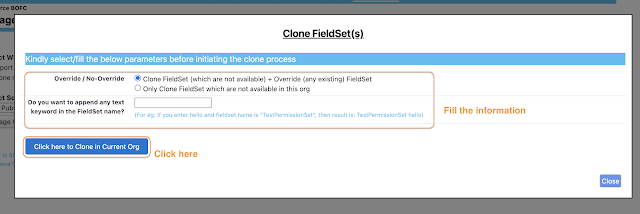
5. Once the “Clone FieldSet(s)” buttons is clicked, it will open a popup with some fields to fill. Once the information is filled, click on “Click here to clone in current org” button.

Clone FieldSet(s)

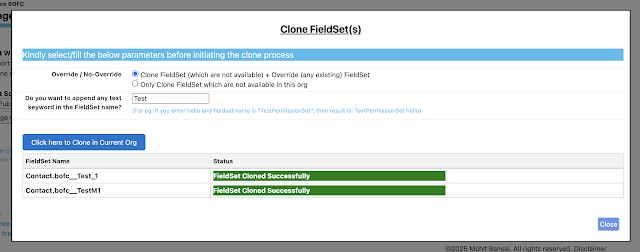
and here is the result:

fieldsets cloned

BOFC turns hours of repetitive Salesforce setup into a few clicks. Try it today and get your admin time back.

Benefits of Cloning Field Sets with BOFC

  • Hours back for every rollout – Clone Field Sets for many objects in one run instead of rebuilding them one object at a time.
  • Consistent orgs – Bring the same Field Sets into a new sandbox, production or client org from a single source.
  • Fewer manual errors – You do not re-add fields by hand, so there is less risk of a missed or mistyped field.
  • Faster migrations – Org migrations, sandbox refreshes and implementation rollouts no longer stall on Field Set setup.
  • One tool for more metadata – The same app also clones Fields, Reports, Layouts, Permission Sets and Flows.

Conclusion

Rebuilding Field Sets object by object is slow, repetitive and easy to get wrong, especially across large orgs and migrations. BOFC lets Salesforce admins and developers clone multiple Field Sets in a few clicks, from the same org or an external org, and get on with the rest of the project.

Ready to try it? Install BOFC, open Clone FieldSets and clone your first batch. If you also need to move Field Sets out of an org, read How to Export Field Sets for Multiple Salesforce Objects.
Like what you see? Share with a friend.

Frequently Asked Questions

A Field Set is a grouping of fields that you create and add to an object. Visualforce pages, Lightning components and Apex can read a Field Set to decide which fields to display, so admins can change what users see without editing code.

Yes, with BOFC. Choose Clone multiple Field Sets, select one or more source objects, fetch their Field Sets, pick the ones you need and clone them in a single run.

Select the source org in BOFC, or add it under Manage Org Details if it is missing. Then select the objects, click Fetch Field Sets, choose the Field Sets and clone them into your current org.

Yes. BOFC clones Field Sets within the same Salesforce org or from an external org.

Yes. In step 3 you can select a single object or multiple source objects, and BOFC fetches all the existing Field Sets for the objects you chose.