How to Bulk Clone Custom Settings in Salesforce?
Published: Sep 24 2022
Last Updated: Aug 18 2026
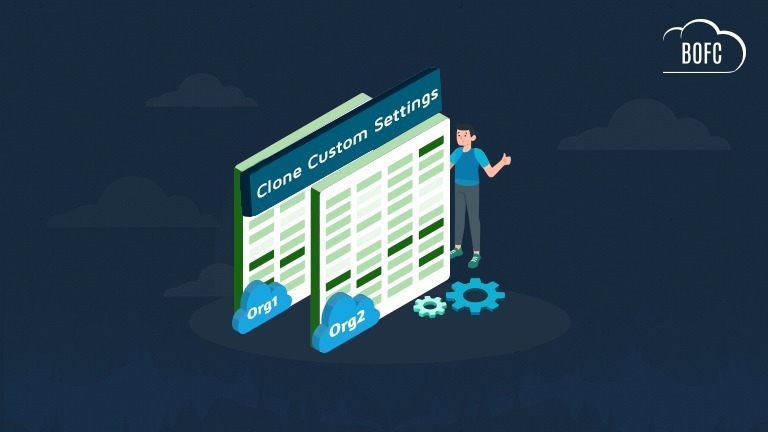
Managing and maintaining Custom Settings across Salesforce orgs can become a difficult and time-consuming task for Salesforce Admins. As businesses expand, teams often need to clone Custom Settings in Salesforce while setting up new orgs, refreshing sandboxes, or replicating production configurations.
However, Salesforce does not provide a simple native solution to bulk clone Custom Settings in Salesforce. Admins are usually forced to rely on manual recreation, change sets, or complicated deployment methods that consume significant time and increase the risk of errors.
In this guide, we will explain the common challenges Salesforce Admins face, the ideal approach to clone Custom Settings in Salesforce, and how BOFC helps simplify the entire process in just a few clicks.
Why Salesforce Admins Need to Clone Custom Settings in Salesforce
Custom Settings in Salesforce are widely used to store:
- Application configurations
- Business process values
- Automation-related data
- Org-specific settings
- Integration parameters
Organizations frequently need to clone Custom Settings in Salesforce for:
- New Salesforce org setup
- Sandbox refresh activities
- Org migration projects
- Multi-org management
- Backup and replication purposes
Without an automated solution, managing these activities manually can become extremely challenging.
How BOFC Helps Clone Custom Settings in Salesforce?
BOFC enables Salesforce Admins to clone Custom Settings in Salesforce quickly and efficiently without complicated deployment steps.
Using BOFC, you can:
- Bulk clone multiple Custom Settings
- Copy Custom Setting records easily
- Reduce repetitive manual tasks
- Improve configuration consistency
- Simplify org replication processes
- Save significant administrative time
Whether you are migrating configurations, setting up a sandbox, or managing multiple Salesforce orgs, BOFC helps streamline the cloning process.
To avail this feature, kindly make sure you have installed the latest version of the application. You can upgrade your package using either of two ways:
- In Salesforce, go to “BOFC Home > Settings > App Version > Click to Upgrade” — or —
- Refer the below button to quickly upgrade your package to the latest version and explore its complete benefits:
Stay up to date with the latest in BOFC - Latest features, offers, news, tips and more
Few Simple Steps to Clone Custom Settings in Salesforce
1. Open the BOFC Home > Click “Clone Custom Settings”
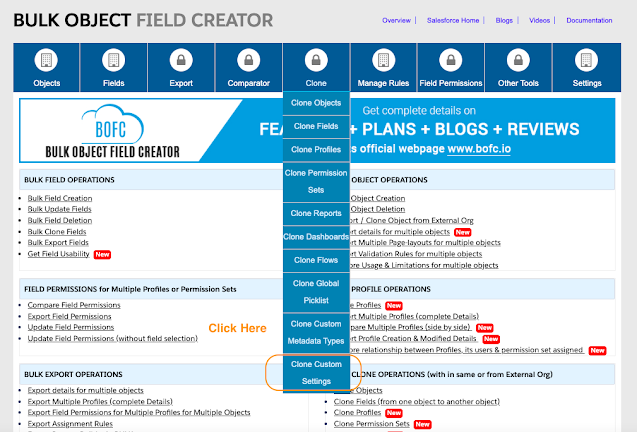
2. It will open below screen for BOFC Clone Custom Settings. Select the mode of Operation as “Clone”

3. Select the “Source Org” from where you want to clone the custom settings
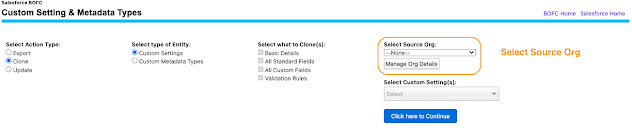
User can clone the custom settings from different type of source orgs:
- Can clone from “Current Salesforce Org” in which BOFC is installed
- Can clone from “External Salesforce org” (Salesforce org which are linked / non-linked to current org in which BOFC is installed)
4. Select the single or multiple custom settings which needs to be cloned. Once ready, click on “Click here to Continue” button to initiate the process.
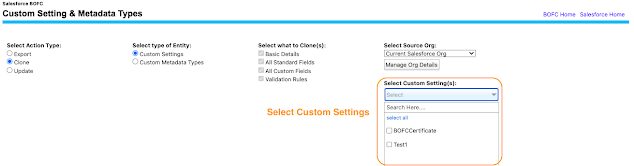
Once this blue button is clicked, it will open a popup with some instruction in it. Just follow the instructions and you are done.
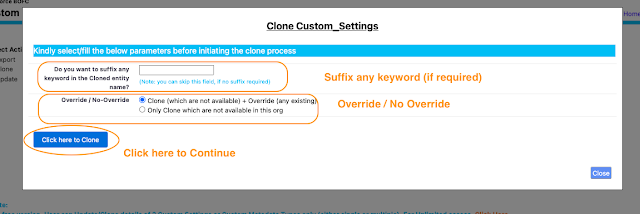
- Append Keyword – User can add any keyword in the Custom Setting Name. If user leaves the field blank, then nothing will be added.
- Type of Action –
- Clone (which are not available) + Override (any existing) = In this case, the clone process will create the new custom settings & override any existing with same name
- Only Clone which are not available in this org = In this case, the clone process will create the custom settings which are not available in the current org
6. Once the “Click here to Clone” buttons is clicked, it will update the status against each row for all the custom settings.
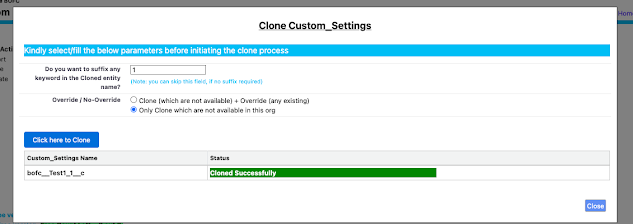
Green means – Custom Settings Cloned Successfully
Red means – Flow got error out because of some reason.
Benefits of Using BOFC to Clone Custom Settings in Salesforce
Faster Salesforce Org Setup
BOFC helps accelerate Salesforce org replication and setup activities.
Reduced Manual Work
Automate repetitive metadata cloning tasks and improve productivity.
Improved Accuracy
Reduce configuration mismatches and minimize human errors.
No Coding Required
Clone Custom Settings in Salesforce without Apex, APIs, or scripting.
Better Multi-Org Management
Maintain consistency across multiple Salesforce environments easily.
Conclusion
Manually trying to clone Custom Settings in Salesforce can be time-consuming, error-prone, and difficult to manage, especially for organizations working across multiple Salesforce environments.
BOFC simplifies the process by enabling Salesforce Admins to bulk clone Custom Settings quickly, accurately, and without coding.
If you are looking for an efficient solution to clone Custom Settings in Salesforce, BOFC can help streamline your Salesforce metadata management and improve admin productivity.