How to Mass Update Field Permissions or FLS in Salesforce?
Published: Jun 15 2020
Last Updated: May 14 2026

Updating field permissions or FLS (Field Level Security) across multiple Profiles and objects in Salesforce can quickly become a time-consuming administrative task. Salesforce admins often need to update field permissions in Salesforce during security reviews, user onboarding, deployment activities, or compliance-related changes.
Using Salesforce’s standard setup for these updates requires opening each Profile individually and update field permissions one field at a time. In large Salesforce orgs, this repetitive process becomes difficult to manage efficiently and can consume significant administrative effort.
Manual permission updates can also increase the chances of inconsistent access settings, missed permission changes, and configuration errors across Profiles. As Salesforce environments continue to scale, managing field permissions manually becomes increasingly inefficient.
Solution
BOFC enables administrators and developers to mass update field permissions across multiple Profiles and objects through a centralized and easy-to-use interface within the same Salesforce org.
The application supports both direct table-based updates and Excel-driven operations, allowing teams to manage field permissions faster and with significantly less manual effort. With BOFC’s drag-and-drop functionality and bulk update capabilities, Salesforce admins can streamline permission management while improving consistency across the org.
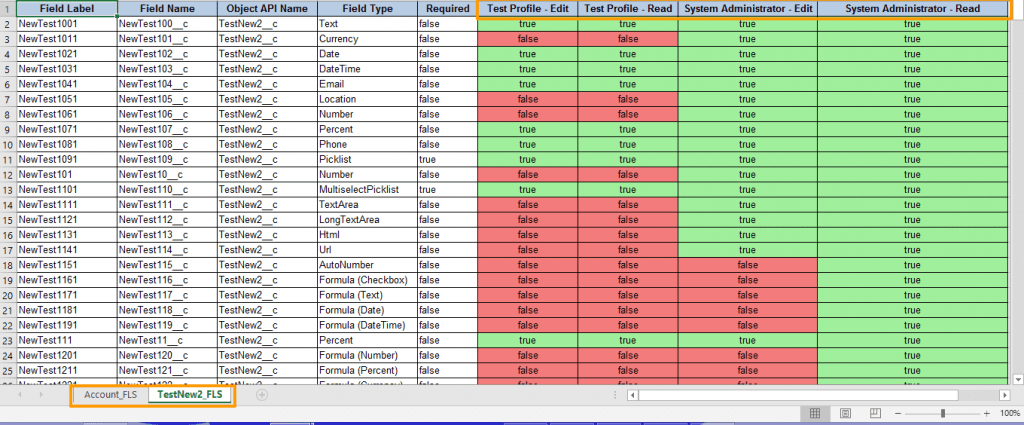
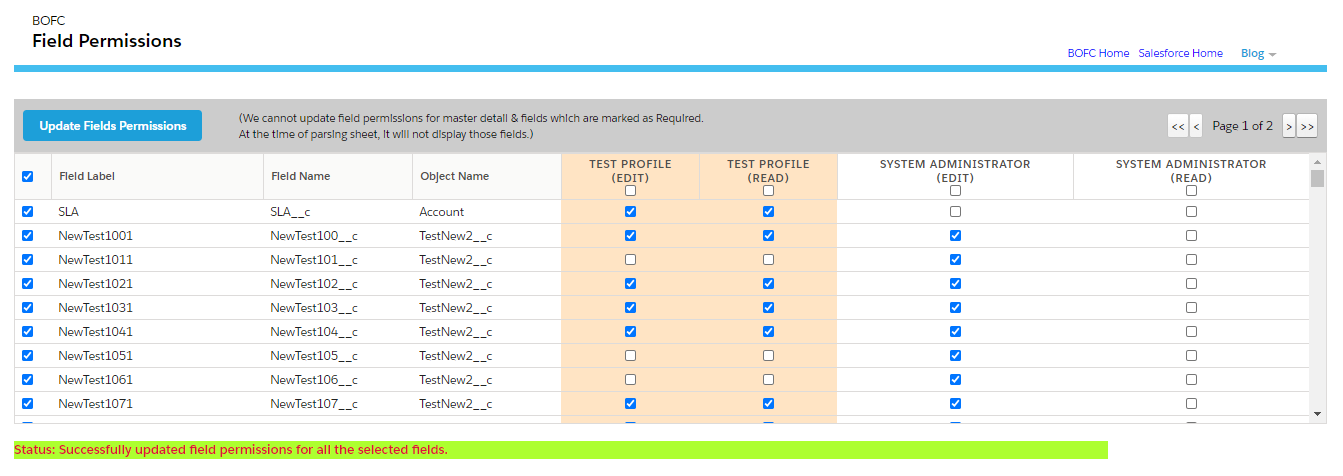
The screenshot below illustrates the final field permission update output generated through BOFC.
To avail this feature, kindly make sure you have installed the latest version of the application. You can upgrade your package using either of two ways:
- In Salesforce, go to “BOFC Home > Settings > App Version > Click to Upgrade” — or —
- Refer the below button to quickly upgrade your package to the latest version and explore its complete benefits:
Guide to Mass Update Field Permissions in Salesforce:
1. Open the BOFC Home > Goto Field Permissions Section
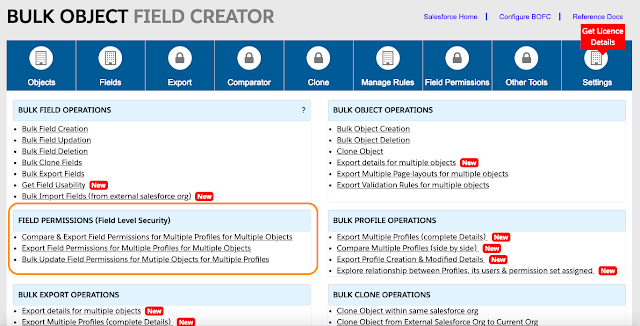
2. It will open below screen for Field Permissions

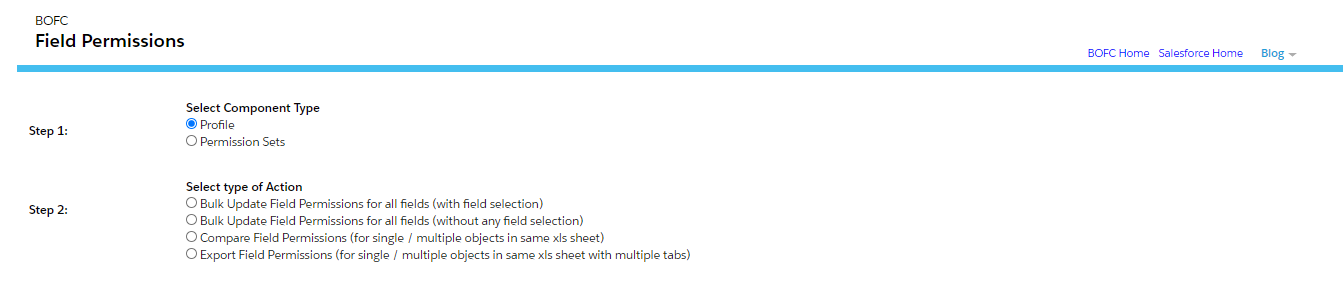
3. Once Profile is selected, it will show below screen:
4. Once update is selected, it will show below screen:
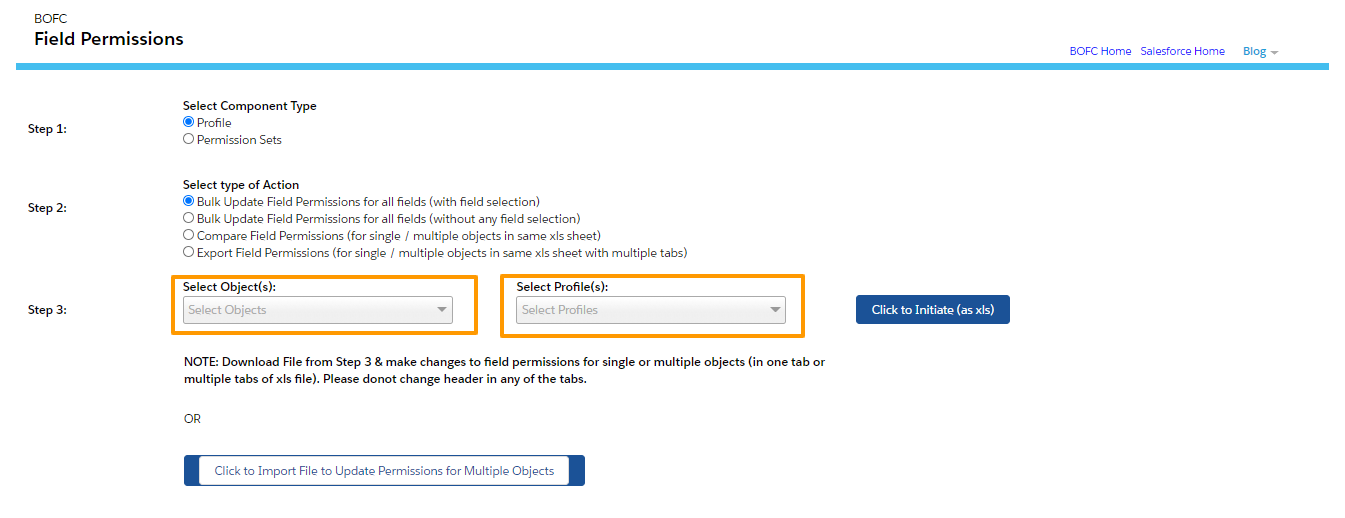
Please select single or multiple objects, and select single or multiple profiles. Once done then click on “Click to Initiate Export (as xls)” button.
5. Please don’t refresh your page, until status is changed to “Completed”.
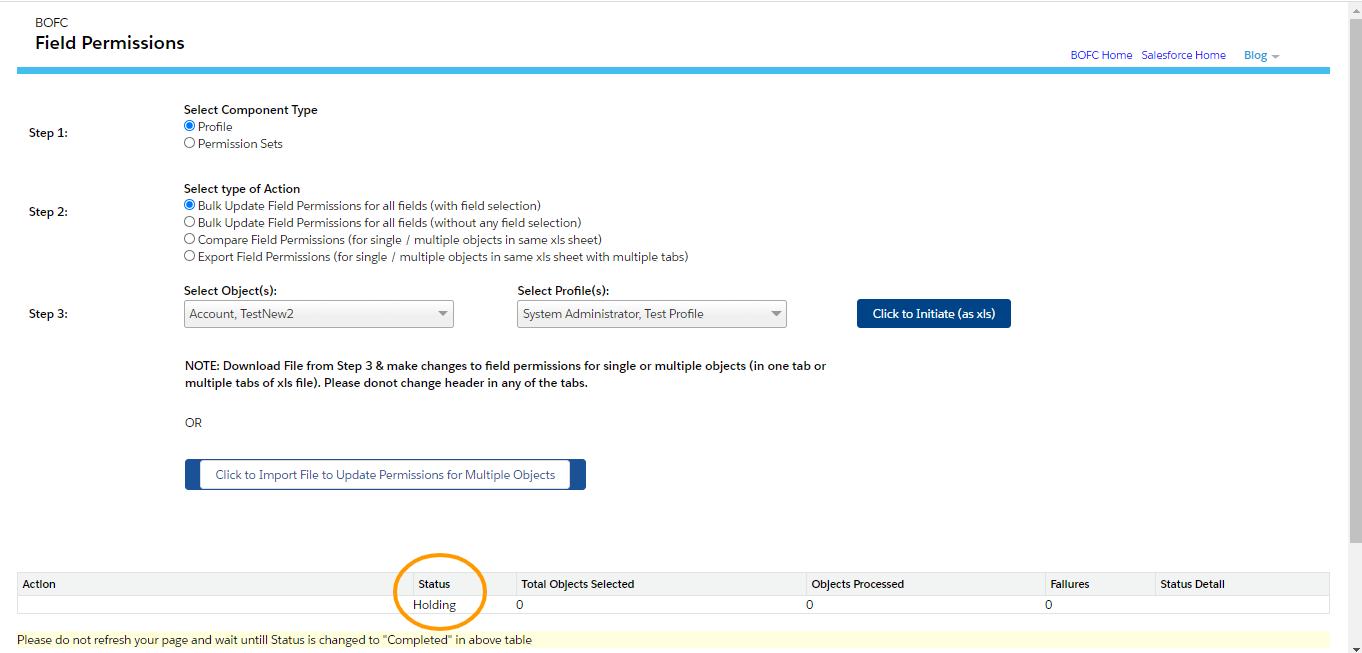
Once it is completed, it will show below screen
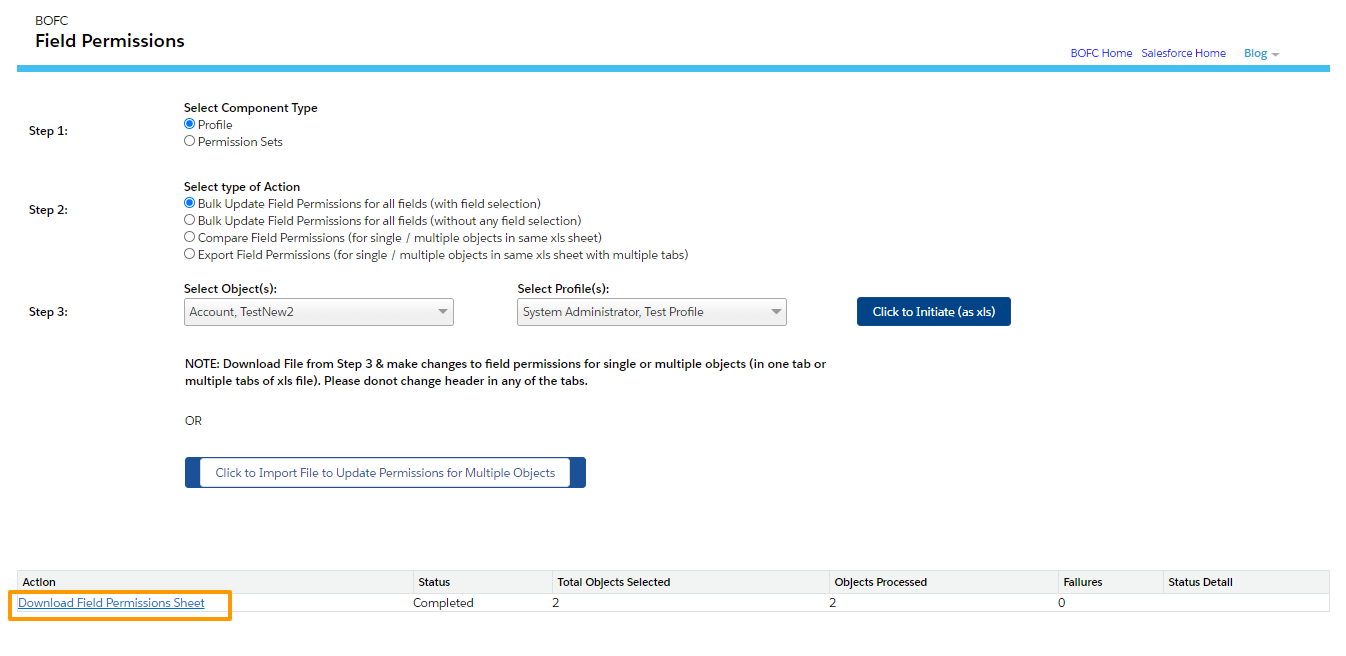
Click on Download link as per above image and your file for field permissions is ready for download for multiple objects.
6. So we are done till Step 5. Now only update part is left. User can open the file which is exported in last step.
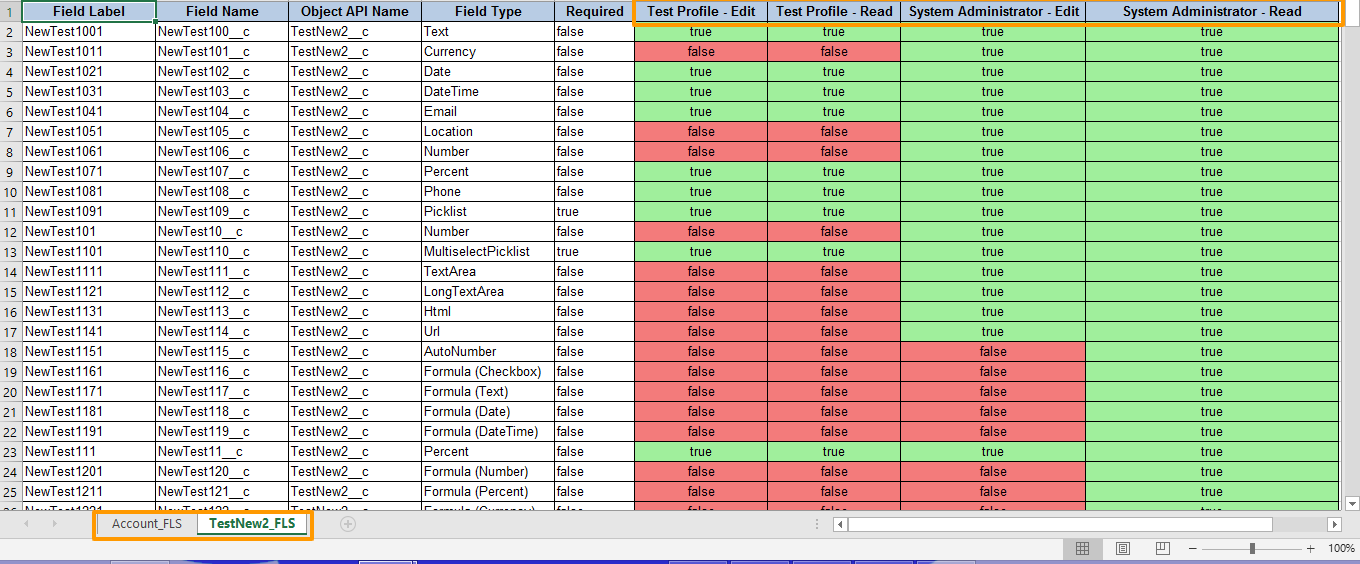
Few pointers to note down:
- Each Object has its own tab in same excel sheet
- Each Profile has two columns. One for Edit and One for Read
- GREEN colour represents TRUE and ORANGE colour represents FALSE
User can modify the field permissions in the same file and can save it.
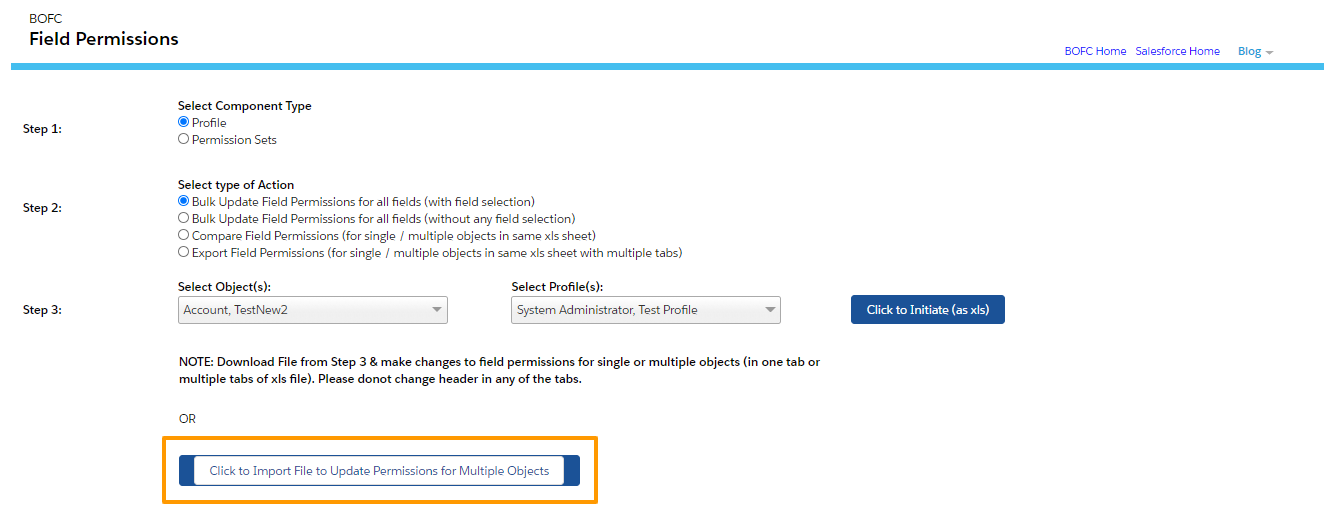
7. Now Upload your updated file on BOFC Field Permission page as highlighted in STEP 5
On upload, it will show below screen, Now select your field row (single or multiple) and click “Update Field Permissions”.
Benefits of Updating Field Permissions with BOFC
Using BOFC for field permission management helps Salesforce administrators reduce repetitive manual work and manage Profile access more efficiently across the org.
Key benefits include:
- Supports both Standard and Custom Objects
- Bulk update field permissions across multiple objects and Profiles instantly
- User-friendly drag-and-drop UI designed for faster admin workflows
- Reduces time spent on manual permission management
- Simplifies large-scale access configuration updates
- Improves consistency across Profile permissions
- Helps streamline security review and compliance processes
- Makes Salesforce permission management easier for large orgs
Outcome
With BOFC, Salesforce teams can update field permissions faster and with significantly less manual effort. The centralized bulk update process helps administrators manage Profile access more efficiently while improving consistency and reducing administrative overhead across Salesforce environments.