Introducing Dev Studio: A Native Salesforce IDE, Right Inside Your Org
Published: Aug 03 2026
Last Updated: Oct 23 2026
BOFC Brings a Fully Native Salesforce IDE
BOFC has long been the tool of choice for Salesforce Admins who need to bulk create, update, clone, compare, and delete metadata — without writing a line of code. Trusted by over 50,000 Salesforce professionals worldwide, with a 4.8/5 rating on AppExchange, it has become the standard for metadata management at scale.
Now, BOFC is bringing that same philosophy to Salesforce Developers – with something the platform has never offered before.
Meet Dev Studio – A fully native Salesforce IDE (integrated development environment) that lives inside your Salesforce Org, secured by your existing Salesforce session, and accessible in a few clicks from anywhere in the platform.
- Not a browser extension.
- Not a marketplace plugin.
- Not a bridge to an external editor.
- No VS Code installation.
- No Lightning Studio extension.
- No CLI authentication.
- No local dependencies of any kind.
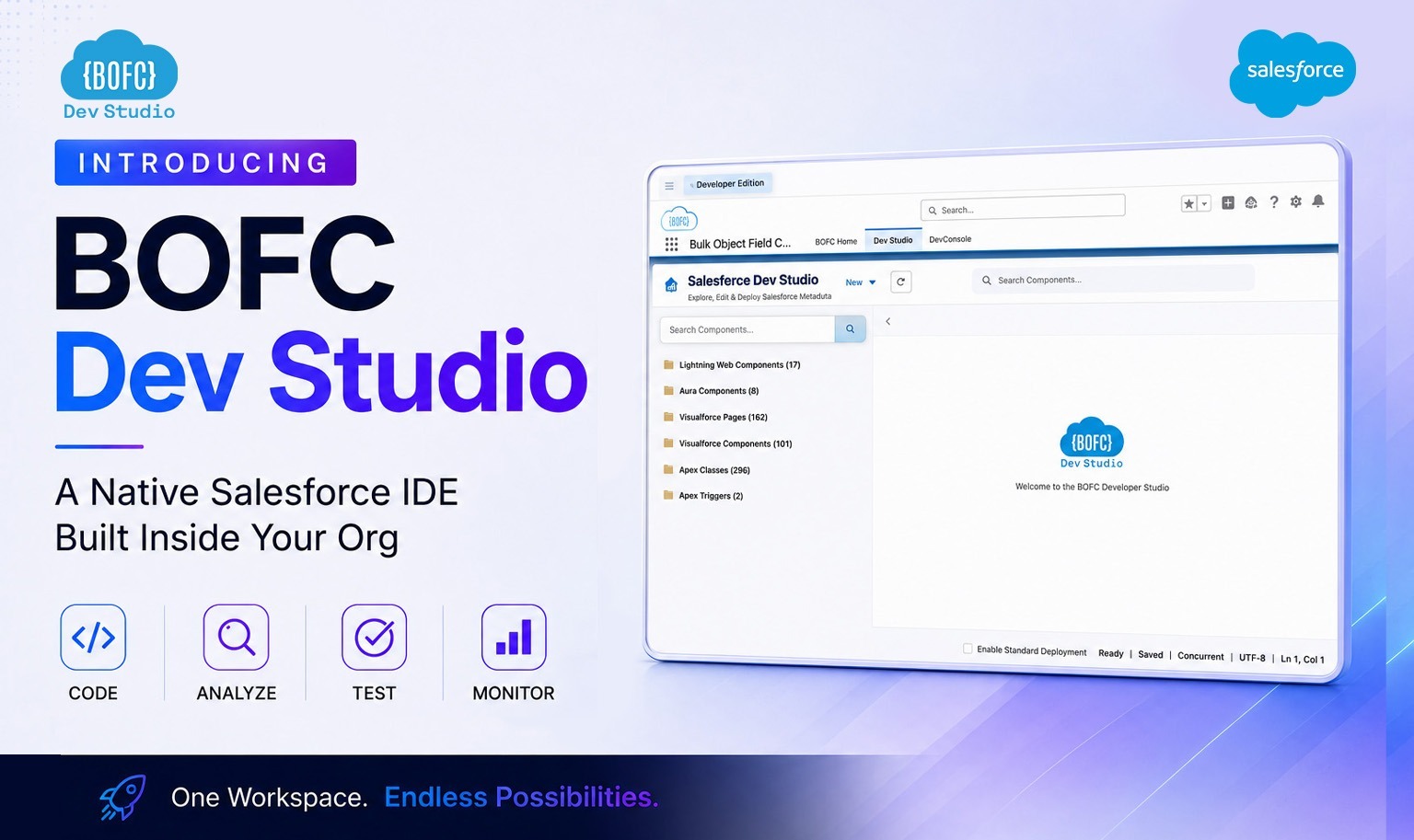
Just open BOFC, navigate to Dev Studio, and your entire custom codebase — LWC, Aura, Apex, Triggers, Visualforce, Static Resources — are right there, ready to create, edit, or delete.
And the best part? Dev Studio is completely FREE for all Salesforce users.
What Is Dev Studio?
Dev Studio is the native Salesforce IDE – delivered as part of BOFC, the leading metadata management application on AppExchange.
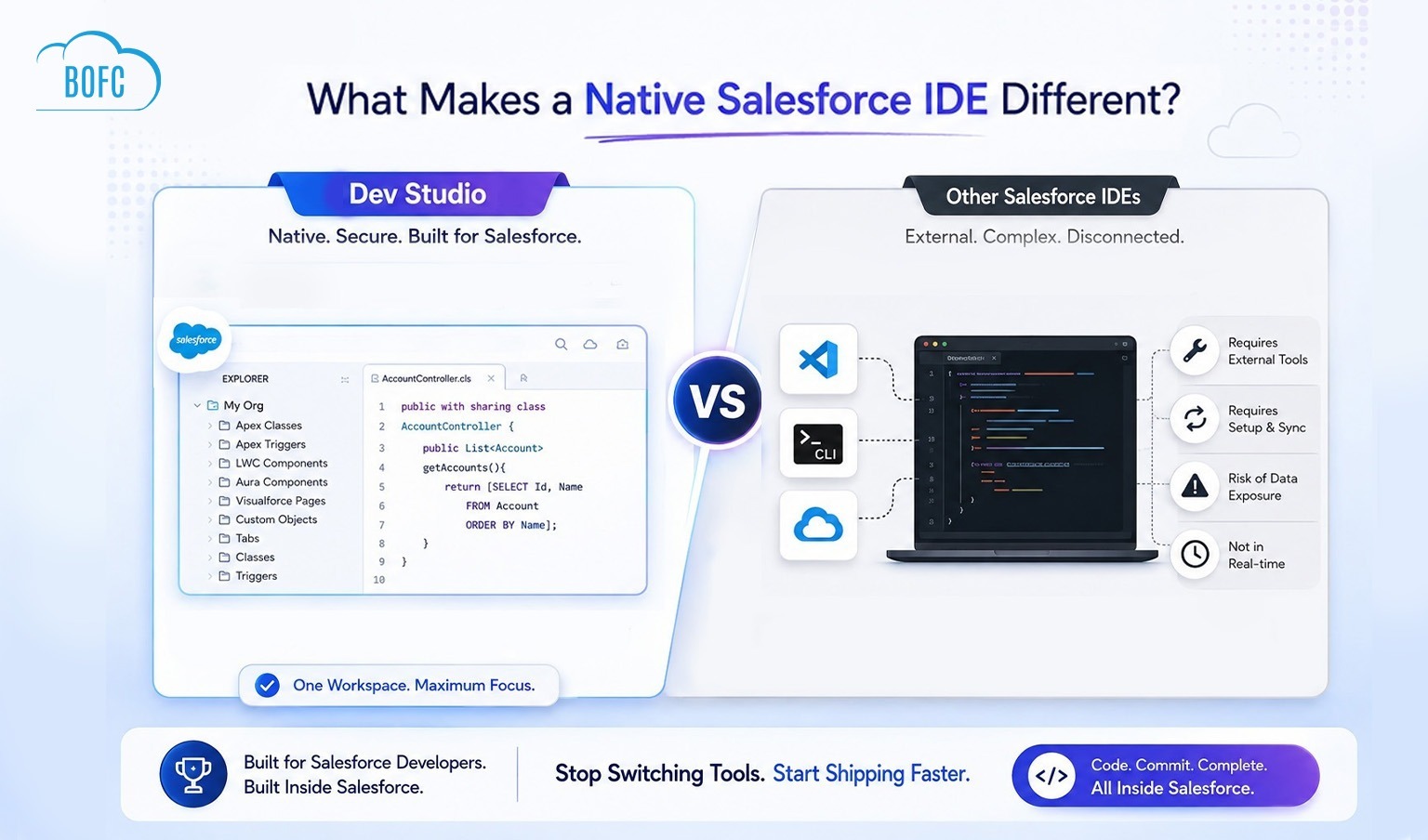
Unlike VS Code with the Salesforce extension pack, or browser-based tools like Lightning Studio that depend on marketplace extensions and external configurations, Dev Studio has zero external dependencies. It is native, secure, and fully contained within your Salesforce Org. It uses your existing Salesforce session for authentication, operates entirely within the platform’s security model, and requires no local setup of any kind.
It brings together every core Salesforce custom code type into a single, unified IDE interface — giving developers one place to manage LWC, Aura Components, Apex Classes, Triggers, Visualforce Pages, and Visualforce Components, Static Resources without jumping between Setup menus, the aging Developer Console, or external tooling.
The Core Pillars of Dev Studio
Dev Studio is built on seven foundational principles that make it unlike anything else available for Salesforce development today:
🚀 Faster Development, Better Delivery – Stop losing time to tooling setup, authentication steps, and metadata syncing. Dev Studio gets you from idea to running code in a fraction of the time – so your team ships faster and delivers more.
🛠️ Built for Salesforce Developers – Every design decision in Dev Studio was made with developers in mind. Clean component lists, an intuitive code editor, direct Org access, and a unified interface for every metadata type — no compromise, no workarounds.
⚡ A Powerful IDE entirely Inside Salesforce – Dev Studio is not a lightweight viewer or a basic editor. It is a capable, full-featured IDE that gives developers the tools they need to create, modify, and manage code — all from within the platform they already work in every day.
🔄 Works Natively (No Switching, No Syncing) – With Dev Studio, there is no context-switching to an external application and no metadata sync cycle. Every change you make is saved directly to the Org in real time. What you see in Dev Studio is your live Org — always.
🔐 Your Org, Your Code Always in Control – Dev Studio gives you complete visibility and control over every piece of custom code in your Org — LWC, Aura, Apex, Triggers, Visualforce, Static Resource — organised in one place, searchable, and fully manageable without relying on any external system.
🚫 No External Platform Dependency – No VS Code required. No Salesforce CLI. No Lightning Studio extension. No marketplace add-ons. Dev Studio is self-contained inside BOFC — a 100% AppExchange-native application. There is nothing to install locally and nothing to maintain outside Salesforce.
🔒 100% Secure Code Always Stays Inside Salesforce – Because Dev Studio runs entirely within your Salesforce Org and operates under your existing Salesforce session and security model, your code never leaves the platform. There is no third-party server, no external data transfer, and no security boundary to cross. Your intellectual property stays exactly where it belongs — inside your Org.
What Dev Studio Supports?
Dev Studio provides full add, edit, and delete capability across the following Salesforce metadata types:
⚡ Lightning Web Components (LWC)
Create new LWC components, edit existing component files (HTML, JavaScript, CSS, metadata XML), and delete components you no longer need — all from a clean, structured interface inside Salesforce. No VS code or any external tool required.
🔆 Lightning Aura Components
View and manage your Aura component library. Add new Aura components, edit controller, helper, style, and markup files, and remove outdated components without touching the Developer Console.
🔷 Apex Classes
Browse all Apex Classes in your Org, create new classes from scratch, edit existing class logic, and delete classes that are no longer in use — with a code editor designed for clarity and speed.
⚙️ Apex Triggers
View all Triggers across your objects, write new Triggers, modify existing Trigger logic, and delete Triggers — without navigating through individual Object Manager pages in Setup.
📄 Visualforce Pages
Manage your entire Visualforce Page library in one place. Create new pages, edit page markup, and delete deprecated pages that have been replaced by Lightning components.
🧩 Visualforce Components
View, create, edit, and delete Visualforce Components — all accessible from the same unified Dev Studio interface, alongside the rest of your codebase.
📁 Static Resources
Download, View, create, edit, and delete Static Resources — all accessible from the same unified Dev Studio interface, alongside the rest of your codebase.
Why Choose Dev Studio?
If you are a Salesforce Developer, you already know the friction.
Every tool available today for writing and managing Salesforce code has a dependency on something outside the platform:
- VS Code requires a local installation, the Salesforce CLI, the Salesforce Extension Pack, Org authentication, a metadata pull, and a push back to the Org every time you make a change
- The Developer Console is native but dated — slow to load, limited in capability, and widely acknowledged as a tool Salesforce has left behind
- Lightning Studio relies on a Chrome extension from the marketplace — an external dependency that must be installed, kept updated, and trusted outside the Salesforce security boundary
- Setup menus scatter your codebase across multiple locations — Apex Classes in one place, Lightning Components in another, Visualforce Pages somewhere else
For every one of these, the developer pays a tax before they can write a single line of code: install something, authenticate something, navigate somewhere, or wait for something to load.
Dev Studio eliminates every one of these taxes.
- It is native to Salesforce.
- It is secured by your existing Salesforce session.
- There is nothing to set up locally.
- There is nothing to authenticate separately
- There is nothing to maintain externally.
Open BOFC, navigate to Dev Studio, and every piece of custom code in your Org is immediately in front of you — organised, searchable, and editable.
Who Is Dev Studio For
Dev Studio is built for Salesforce Developers of all experience levels — but it is particularly valuable for:
- Solo developers and consultants managing multiple Orgs who need quick, low-friction access to code across environments
- Development teams looking for a lightweight in-platform option for quick edits, code reviews, and urgent fixes without the full VS Code / SFDX setup
- Developers who also wear an Admin hat and want to manage both metadata and code from the same application — BOFC — without context-switching
- Sandbox and UAT managers who need to create, edit, or validate components in non-production environments quickly
- Developers new to Salesforce who want a guided, approachable interface to explore and manage code without being overwhelmed by CLI tooling
Totally Free – No Strings Attached
Dev Studio is included at no additional cost for every BOFC user — across all plans, including the free tier.
If you have BOFC installed in your Salesforce Org, Dev Studio is already available to you. No upgrade required. No separate installation. Just open BOFC and find Dev Studio waiting in the navigation.