How to Mass Update Record Types in Salesforce?
Published: Mar 31 2020
Last Updated: May 27 2026
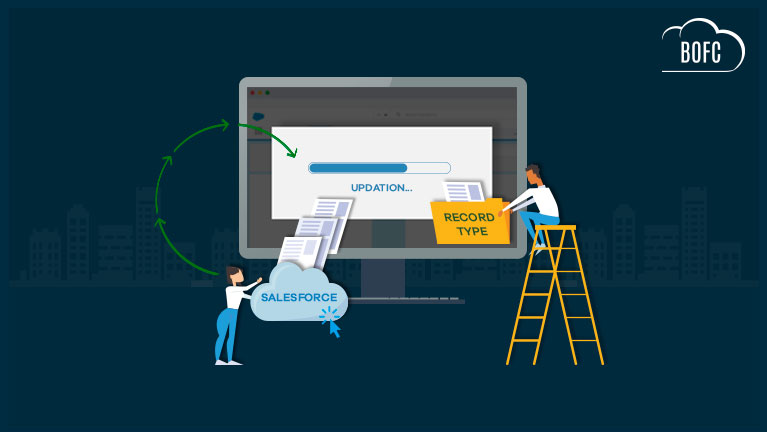
Managing Record Types and Picklist values in Salesforce can become time-consuming when updates need to be applied across multiple objects and configurations. Salesforce Admins often need to modify Record Type details, assign Picklist values, or maintain consistency between multiple business processes during org cleanup, deployment preparation, or ongoing administration.
Using standard Salesforce setup, these updates typically require opening each Record Type individually and manually managing Picklist assignments one by one. As the number of objects and Record Types increases, the process becomes repetitive, difficult to track, and harder to maintain efficiently.
Common Challenges with Salesforce Record Type Management
Salesforce teams often face several limitations while managing Record Types and Picklist values manually:
- No centralized way to update multiple Record Types together
- Repetitive manual configuration across different objects
- Time-consuming Picklist value assignments and updates
- Difficult to maintain consistency across large Salesforce orgs
- Increased chances of missing configurations or introducing errors
- Inefficient process for enterprise-level metadata management
These challenges can slow down administrative operations and make Salesforce configuration management more difficult to scale.
Bulk Update Record Types and Picklist Values with BOFC
BOFC simplifies Salesforce Record Type management by allowing Admins and Developers to bulk update Record Type details and Picklist values in just a few clicks.
Instead of manually updating each Record Type separately, BOFC provides a centralized and user-friendly interface to perform bulk operations across multiple Standard, Custom, and Managed Objects directly within Salesforce.
Using BOFC, teams can:
- Bulk update Record Type basic details
- Assign or remove Picklist values across multiple Record Types
- Manage multiple objects from a single interface
- Reduce repetitive administrative effort
- Improve consistency across Salesforce configurations
- Streamline metadata management activities
Simple Steps to Mass Update Record Types in Salesforce
1. Open the BOFC Home > Go to Record Type Section & click the highlighted link
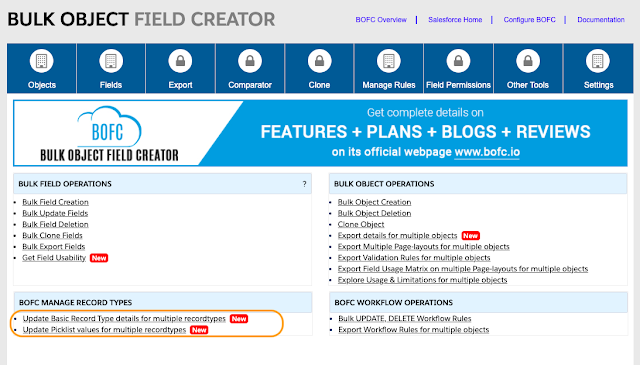
2. It will open below screen for BOFC Manage Record Types

User can perform two kind of update operation:
- Update Basic details of Record Types (follow steps 3 to 7)
- Update Picklist values assigned to multiple Record Types (follow step 8 to 12)
Will go through both the functionality one by one
************************************
Update Basic details of Record Types
3. Select Object (single or multiple) & choose “Basic details” radio button as shown in below image. Once selected, click on “Fetch Details”

4. Select (single or multiple) record types & click “Display Record Type Details”
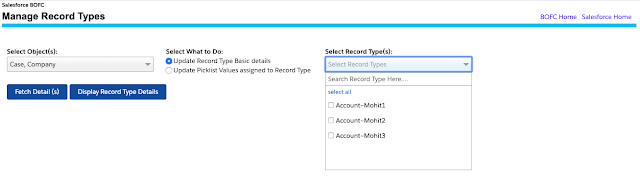
5. Once clicked, it will display basic details for all the record types selected in step 4. User can modify the details and select the rows which needs to be updated.
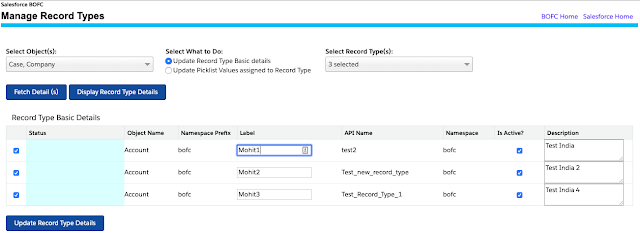
6. Once all the changes are done, click on “Update Record Type Details”
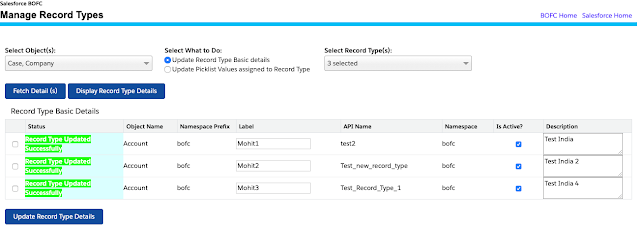
7. Once the update action is completed, it will show “Success or Error” status message in-front of each row.
********************************************************
Update Picklist values for Multiple Record Types
8. Select Object (single or multiple) & choose “Update Picklist Values” radio button as shown in below image. Once selected, click on “Fetch Details”

9. Select record type (single or multiple), select Picklist (single or multiple) & click “Display Details”
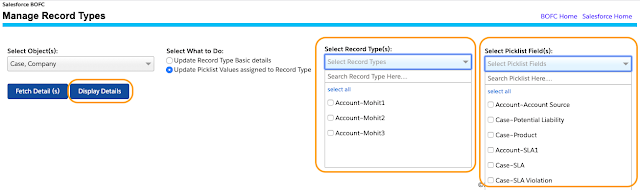
10. Once clicked, it will display all the selected picklist for all the record types selected in step 9. User can add or remove pick list values by clicking the required arrows and select the Picklist rows which needs to be updated.
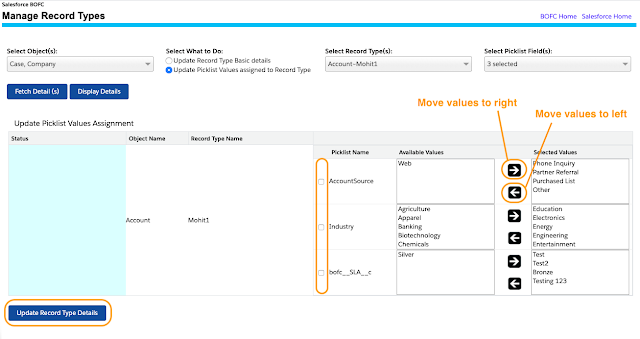
11. Once all the changes are done, click on “Update Record Type Details”
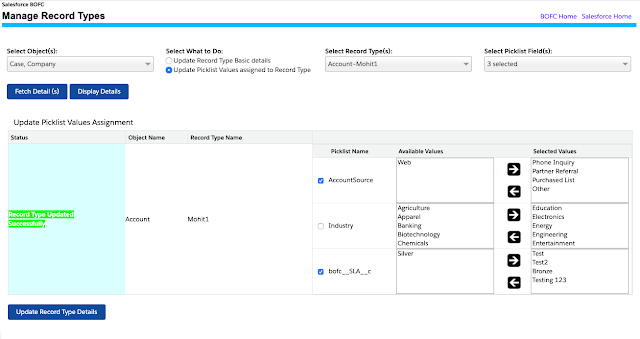
12. Once the update action is completed, it will show “Success or Error” status message in-front of each row.
Benefits of Using BOFC for Record Type Updates
BOFC helps Salesforce teams perform metadata updates faster while improving operational efficiency and scalability.
Key benefits include:
- Faster execution of Record Type updates
- Simplified Picklist value management
- Improved configuration consistency
- Reduced manual setup effort
- Better support for large Salesforce environments
- User-friendly point-and-click experience
By simplifying bulk Record Type management, BOFC helps Admins and Developers focus more on optimizing Salesforce operations rather than spending time on repetitive configuration tasks.
Conclusion
Updating Record Types and Picklist values manually in Salesforce can become a repetitive and time-intensive process, especially in orgs with multiple objects and complex business requirements.
BOFC provides a faster and more scalable solution by enabling bulk Record Type and Picklist updates through an intuitive interface. Whether you are managing org standardization, deployment preparation, or ongoing metadata maintenance, BOFC helps simplify Salesforce administration while significantly improving productivity.